


Free demo, instant delivery, a year of free new-version downloads, bountiful discounts on your next purchase, and 24/7 agents with infinite patience: ExamTorrent gives 2026 AZ-204 candidates a worry-free route through Microsoft Developing Solutions for Microsoft Azure.
Microsoft AZ-204 Exam Syllabus Topics:
| Section | Weight | Objectives |
|---|---|---|
| Develop Azure compute solutions | 25% | - Implement IaaS solutions
|
| Develop for Azure storage | 20% | - Develop solutions that use Blob storage
|
| Implement Azure security | 20% | - Implement secure data solutions
|
| Monitor, troubleshoot, and optimize Azure solutions | 20% | - Troubleshoot solutions
|
| Connect to and consume Azure services and third-party services | 15% | - Develop API-based solutions
|
AZ-204 Exam FAQ: Save Time, Read This
Microsoft Developing Solutions for Microsoft Azure is an official Microsoft certification exam, listed under the code AZ-204. Passing it earns the Microsoft Certified: Azure Developer Associate certification at the Associate level. It also ties into Microsoft Certified: Azure Developer Associate, Microsoft Certified: Azure Fundamentals (optional foundation). In an era of lifelong learning, this credential is one of the most efficient ways to prove your skills keep pace.
Microsoft Developing Solutions for Microsoft Azure gives you Approximately 40–60 questions across 120 minutes. The efficient approach: one to two hours of daily timed practice in the ExamTorrent engine builds both the knowledge and the pacing, so exam day feels like simply another well-run session.
Passing Microsoft Developing Solutions for Microsoft Azure takes 700 (out of 1000), and the official registration fee is USD 165 (may vary by country/region). Retakes cost the full USD 165 (may vary by country/region) again, so treat your ExamTorrent practice scores as the decision-maker: book when the passing line sits below your everyday results, not your best ones.
The Microsoft Developing Solutions for Microsoft Azure syllabus is organized into 5 domains, led by Connect to and consume Azure services and third-party services (15%), Develop Azure compute solutions (25%), and Monitor, troubleshoot, and optimize Azure solutions (20%). The complete breakdown is above on this page; it is the fastest way to learn where your limited preparation hours belong.
No formal prerequisites required, but recommended experience with Azure development, C#, and Azure SDKs.
Vendor policies are revised periodically, so verify the current requirements before registering via the official exam page.
Registration for Microsoft Developing Solutions for Microsoft Azure goes through the official channels below.
For planning: the exam is delivered Online proctored exam or onsite testing center (Pearson VUE).
Microsoft recommends the following training for Microsoft Developing Solutions for Microsoft Azure candidates.
Follow any training with daily practice on the 655 questions in the ExamTorrent AZ-204 package; sorted by authorized expert groups, they turn course theory into exam-ready skill.
Yes on both counts. Download the free demo of the Microsoft Developing Solutions for Microsoft Azure questions first, and browse the comments written by former customers for a second opinion. After purchase, new versions are sent to you as soon as they release, free for 365 days; after expiry, extending the update service costs 50% of the regular price.
Worry-free means a 100% money-back guarantee with stated conditions. Take the Microsoft Developing Solutions for Microsoft Azure exam within 60 days of purchase; if you fail, you may claim a full refund, provided the exam matches your product. Attempts within 3 days of purchase are ineligible, as are downloaded-but-unused products, free materials, and expired orders; the candidate name must match the payer name. Submit a scanned enrollment slip and the official Score Report PDF within 2 days of the exam, and claims are processed within 7 days. Alternatively, exchange for two other exam products of equal value, free, keeping the update service on your original purchase.
Delivery is instant: download your files the moment you pay, with an email copy arriving within one minute. If nothing arrives within 2 hours, check spam and contact customer service, online 24/7 with infinite patience. Installation is unlimited across your computers.
Microsoft Developing Solutions for Microsoft Azure Sample Questions:
Drag and Drop Question
You develop and deploy a web app to Azure App Service in a production environment. You scale out the web app to four instances and configure a staging slot to support changes.
You must monitor the web app in the environment to include the following requirements:
- Increase web app availability by re-routing requests away from instances with error status codes and automatically replace instances if they remain in an error state after one hour.
- Send web server logs, application logs, standard output, and standard error messaging to an Azure Storage blob account.
You need to configure Azure App Service.
Which values should you use? To answer, drag the appropriate configuration value to the correct requirements. Each configuration value may be used once, more than once, or not at all. You may need to drag the split bar between panes or scroll to view content.
NOTE: Each correct selection is worth one point.
Correct Answer:

Explanation:
Box 1: Health check
Health check increases your application's availability by re-routing requests away from unhealthy instances, and replacing instances if they remain unhealthy. Your App Service plan should be scaled to two or more instances to fully utilize Health check.
Box 2: Diagnostic setting
Azure provides built-in diagnostics to assist with debugging an App Service app.
With the new Azure Monitor integration, you can create Diagnostic Settings to send logs to Storage Accounts, Event Hubs and Log Analytics.
Reference:
https://docs.microsoft.com/en-us/azure/app-service/monitor-instances-health-check
https://docs.microsoft.com/en-us/azure/app-service/troubleshoot-diagnostic-logs
Your company's Azure subscription includes an Azure Log Analytics workspace.
Your company has a hundred on-premises servers that run either Windows Server 2012 R2 or Windows Server 2016, and is linked to the Azure Log Analytics workspace. The Azure Log Analytics workspace is set up to gather performance counters associated with security from these linked servers.
You must configure alerts based on the information gathered by the Azure Log Analytics workspace.
You have to make sure that alert rules allow for dimensions, and that alert creation time should be kept to a minimum. Furthermore, a single alert notification must be created when the alert is created and when the alert is resolved.
You need to make use of the necessary signal type when creating the alert rules.
Which of the following is the option you should use?
- A. The Activity log signal type.
- B. The Application Log signal type.
- C. The Metric signal type.
- D. The Audit Log signal type.
Correct Answer: C 🗳️
Explanation: Only visible for ExamTorrent members. You can sign-up / login (it's free).
Hotspot Question
You are building a website that is used to review restaurants. The website will use an Azure CDN to improve performance and add functionality to requests.
You build and deploy a mobile app for Apple iPhones. Whenever a user accesses the website from an iPhone, the user must be redirected to the app store.
You need to implement an Azure CDN rule that ensures that iPhone users are redirected to the app store.
How should you complete the Azure Resource Manager template? To answer, select the appropriate options in the answer area.
NOTE: Each correct selection is worth one point.
Correct Answer:

Explanation:
Box 1: DeliveryRuleIsDeviceConditionParameters
We are first checking for a device condition, hence we need to use the condition of DeliveryRuleDeviceConditionParameters Box 2: Mobile The devices can be either Desktop or Mobile. These are the two accepted values. Here since we need to route requests based on mobile devices, we need to choose the value of Mobile.
Box 3: DeliveryRuleRequestHeaderConditionParameters
We need to understand the type of operating system running on the device. We can get this information from the request headers. Hence, we need to use the parameter of DeliveryRequestHeaderConditionParameters.
Box 4: HTTP_USER_AGENT
We can check the HTTP_USER_AGENT property in the request header. In the user agent property of the request header, you will normally get information about the environment where the request is originating from. An example is given below where I am showing the request header from my own machine when I browse to a site.
Box 5: iPhone
We are not looking for other Apple devices running iOS. It's the iPhone we're looking for.
Reference:
https://docs.microsoft.com/en-us/python/api/azure-mgmt-cdn/azure.mgmt.cdn.models.isdevicematchconditionparametersmatchvaluesitem?view=azure- python
https://docs.microsoft.com/en-us/azure/cdn/cdn-standard-rules-engine-match-conditions
Hotspot Questions
You have an app that stores player scores for an online game. The app stores data in Azure tables using a class named PlayerScore as the table entity. The table is populated with 100,000 records.
You are reviewing the following section of code that is intended to retrieve 20 records where the player score exceeds 15,000. (Line numbers are included for reference only.)
You have the following code. (Line numbers are included for reference only.)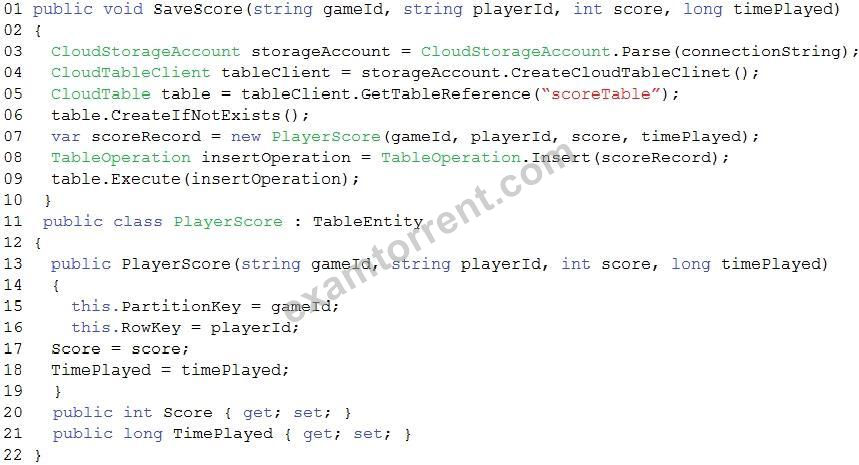
You store customer information in an Azure Cosmos database. The following data already exists in the database:
You develop the following code. (Line numbers are included for reference only.)
For each of the following statements, select Yes if the statement is true. Otherwise, select No.
NOTE: Each correct selection is worth one point.
Correct Answer:

Explanation:
Box 1: No
Box 2: Yes
The TableQuery.Take method defines the upper bound for the number of entities the query returns.
Example:
query.Take(10);
Box 3: Yes
Box 4: Yes
References:
https://www.vkinfotek.com/azureqa/how-do-i-query-azure-table-storage-using-tablequery-class.html
A company is implementing a publish-subscribe (Pub/Sub) messaging component by using Azure Service Bus. You are developing the first subscription application.
In the Azure portal you see that messages are being sent to the subscription for each topic. You create and initialize a subscription client object by supplying the correct details, but the subscription application is still not consuming the messages.
You need to complete the source code of the subscription client
What should you do?
- A. await subscriptionClient.AddRuleAsync(new RuleDescription (RuleDescription.DefaultRuleName, new TrueFilter()));
- B. subscriptionClient = new SubscriptionClient(ServiceBusConnectionString, TopicName, SubscriptionName);
- C. subscriptionClient.RegisterMessageHandler(ProcessMessagesAsync, messageHandlerOptions);
- D. await subscriptionClient.CloseAsync();
Correct Answer: C 🗳️
Explanation: Only visible for ExamTorrent members. You can sign-up / login (it's free).
Viewing page 1 out of 131 pages.
Viewing questions 1-5 out of 655 questions.


 870 Customer Reviews


